Skip to content

SOFTWARE FOR MADE-TO-ORDER FACTORIES

Draw it once.
The rest follows.

The offer, the material list, the cutting plan, the labels and the delivery all come from the same design. Nobody retypes a list, nobody recounts the steel — and your quote goes out while the client is still deciding.

Give your dealers their own ordering portal

Pick your factory

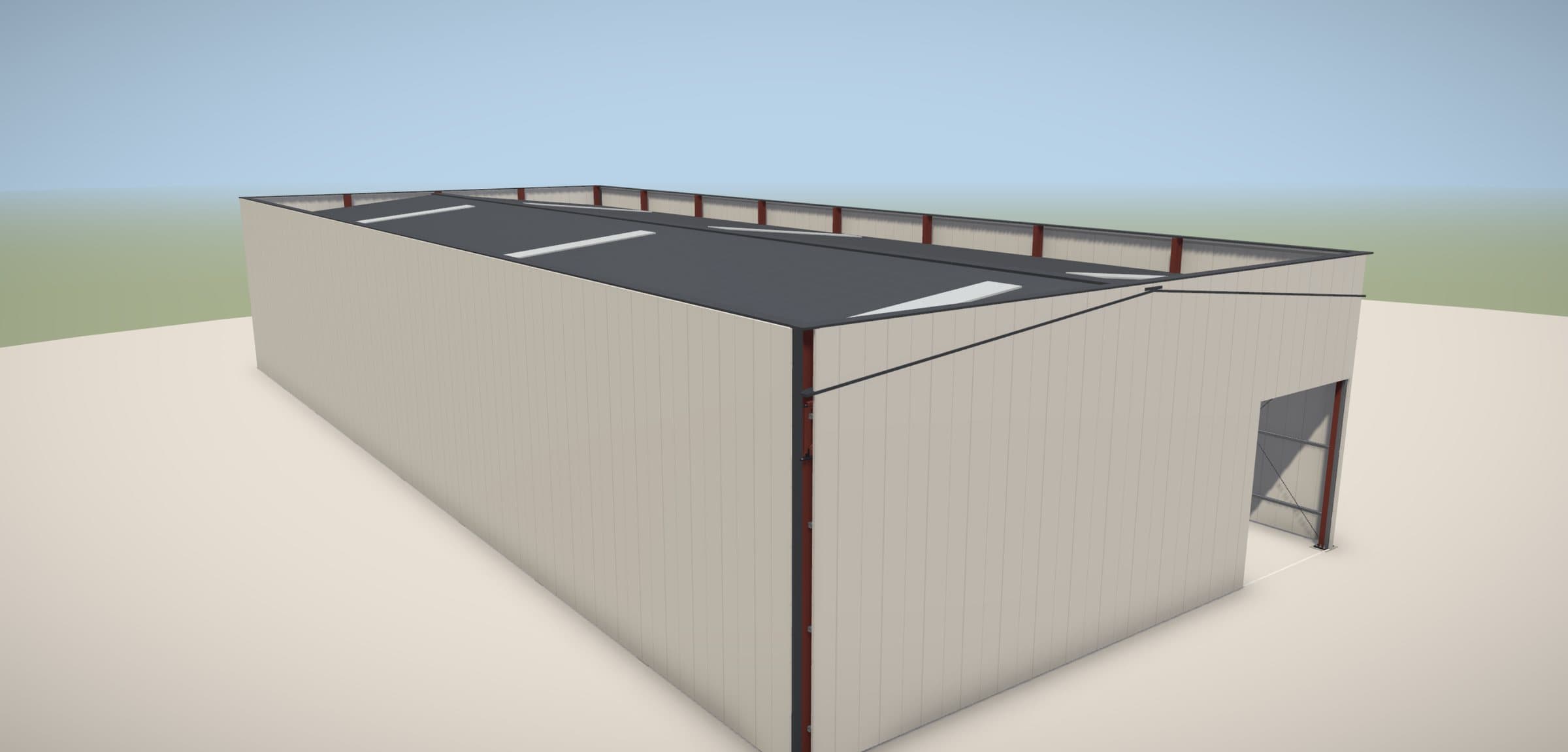
Metal OS 3D presentation of a steel hall, captured from the product.
Product film · demo data
Sample projectSteel hall 20 × 40 m43,794 kgHRC → stock → project

Metal OS

From the 3D hall to the delivered steel.

  • Draw the hall in 3D — the offer, steel list and weights follow from the model.
  • Cutting plans, saw tickets with QR and remnants back in stock.
  • Checks, packing and delivery against the released project.
Explore Metal OS

Stop doing it by hand.

Every hour spent retyping lists, recounting steel and phoning the workshop is an hour not spent winning the next order. These are the jobs Factory OS takes off your desk.

  • № 01Metal OS

    By handCounting steel for the offer with a calculator.

    With Factory OSDraw the hall in 3D. The offer, steel list and weights come from the same model.

  • № 02Metal OS

    By handRedrawing the job for the investor and the site crew.

    With Factory OSPrint an A3 presentation sheet for the investor and an erection manual for the crew — straight from the project.

  • № 03Metal OS

    By handWorking out which bars to order, supplier by supplier.

    With Factory OSConfirmed projects become a purchase plan: full bars, netted against stock, one order per supplier.

  • № 04Metal OS

    By handPhoning round every morning to find out what’s late.

    With Factory OSOne email each morning: what’s being cut today, what’s late and where capacity clashes.

  • № 05Every factory

    By handTyping supplier invoices in by hand.

    With Factory OSPhotograph the invoice. AI reads it into your expenses — you just check it.

  • № 06Every factory

    By handWorkers walking to the office to ask what’s next.

    With Factory OSEveryone sees their own work on the phone and marks it done with a tap.

Built for what you make.

Steel structures. Windows and doors. Kitchens and furniture. Glass. Not one generic program stretched across every trade — each solution knows its own material, and every screen below is the real product.

METAL & STEEL FABRICATION

Metal OS

Quote it straight from the model.

Draw the hall or import the detailing. The offer, steel list, purchase plan, cutting, checks and delivery all work from that one model — so the steel you quoted is the steel you buy, cut and ship.

How the work moves

  1. 1Price it from the model
  2. 2Buy only what the job needs
  3. 3Cut to plan, keep the remnants
  4. 4Catch problems before the client does
  5. 5Ship exactly what was approved
Explore Metal OS
Metal OSStructure & presentation
Actual product view · Demo

Sample project17 × 40 meave 6.3 m9 framesridge 7.2 mtruss roof

The technical model and the client presentation, captured from the product.

Real screens from the live product — no mock-ups.

PVC WINDOWS & DOORS

Windows & Doors

Win the order on the spot.

Configure the window and see the price from your own rates. Send the client a 3D link, see which option they pick, and turn it into a cutting plan — with a QR passport on every window that leaves.

How the work moves

  1. 1Configure the right window
  2. 2Price it from your own rates
  3. 3Let the client choose in 3D
  4. 4Catch mistakes before production
  5. 5Cut every bar to plan
Explore Windows & Doors
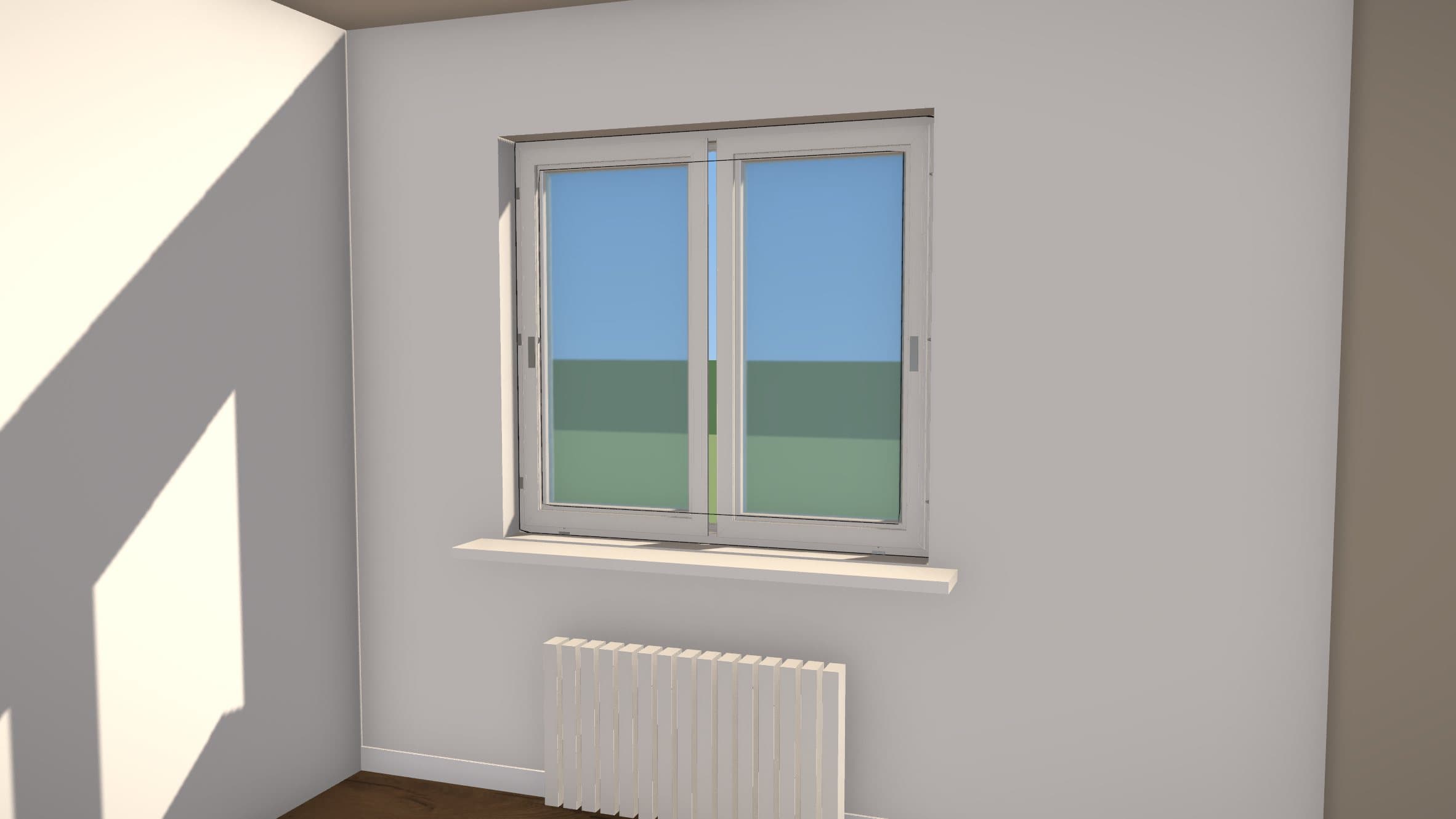
Windows & DoorsRoom & profile
Actual product view · Demo

Sample project1500 × 1400 mmprofile 70 mm2 sashesglass 24 mm

See the window in its room, then inspect the profile in the CAD viewer.

Real screens from the live product — no mock-ups.

KITCHENS & CABINET PRODUCTION

Kitchens & Furniture

Sell the kitchen before it exists.

Clients buy what they can picture: photoreal 3D in real decors, shared with one link. Then the same design becomes the cutting plan, the QR-labelled packages and the installation date.

How the work moves

  1. 1Bring the idea to life
  2. 2Make the offer clear
  3. 3Send it straight to production
  4. 4Follow every part to packing
  5. 5Finish with a planned installation
Explore Kitchens & Furniture
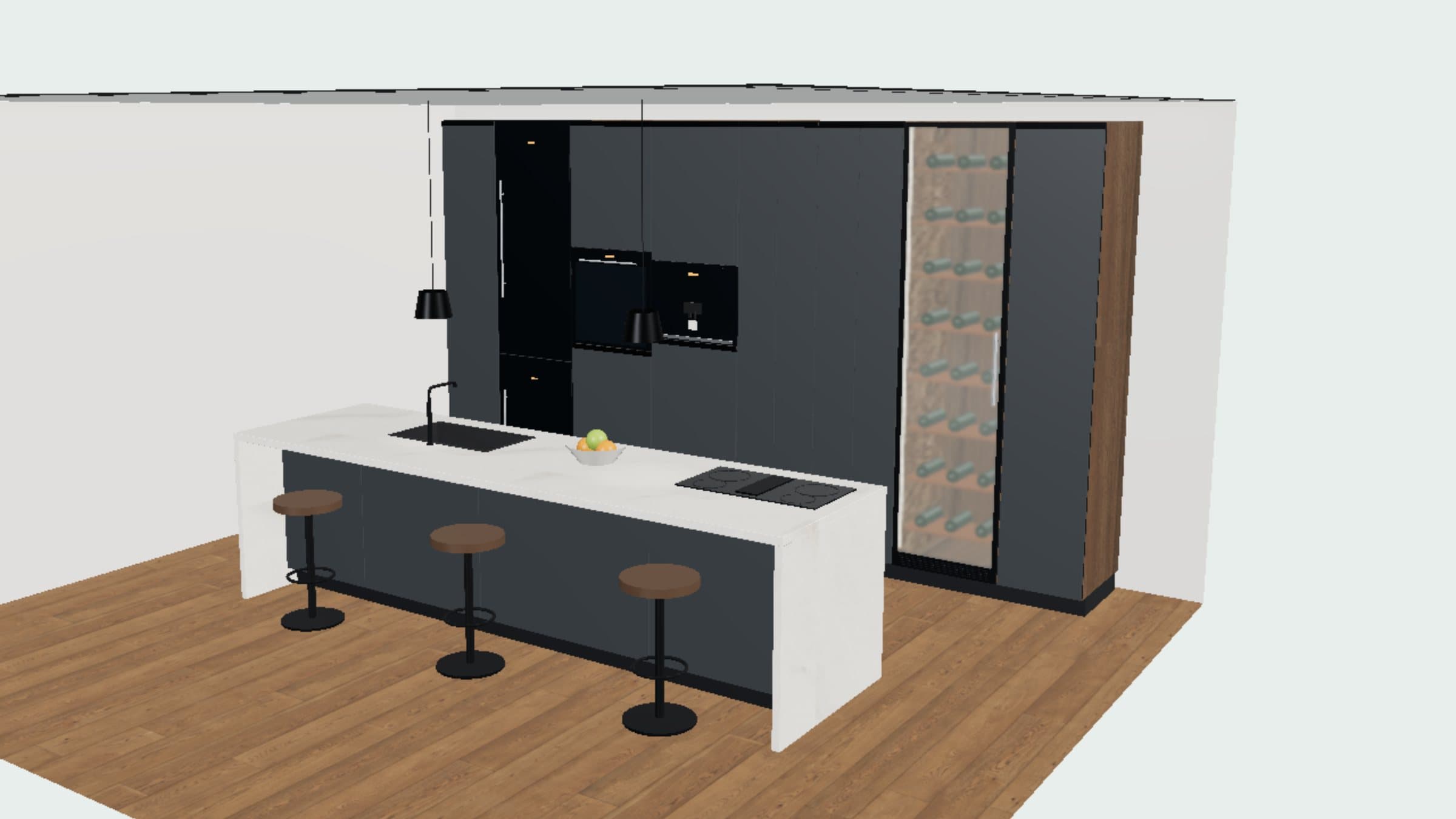
Kitchen StudioPerspective & top view
Actual product view · Demo

Sample projectback wall 5,200 mm7 tall unitsisland

Explore the kitchen in 3D and see the same layout from above.

Real screens from the live product — no mock-ups.

GLASS PROCESSING & INSULATED GLASS

Glass Processing

Every pane accounted for.

Customers order through their own portal, you plan the cutting from your stock sheets, and every insulated unit — shown in 3D before it is made — is followed by its barcode through production, onto the rack and out to delivery.

How the work moves

  1. 1Take the order
  2. 2Plan the glass
  3. 3Make every unit traceable
  4. 4Load and deliver
  5. 5Close the books
Explore Glass Processing
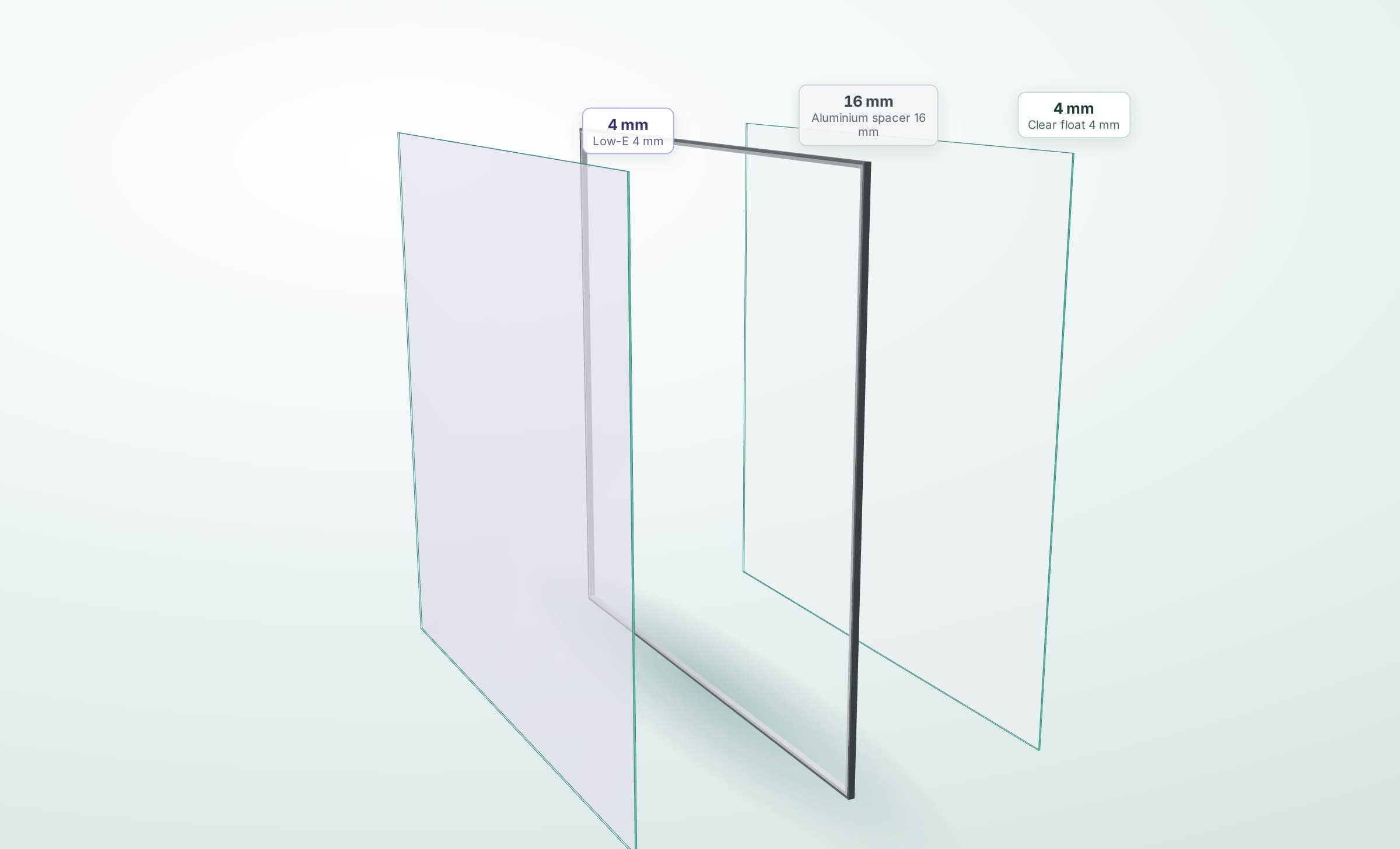
Glass Processing3D unit & cutting plan
Actual product view · Demo

Sample project1420 × 1380 mm4 / 16 / 4Low-E39.2 kg

Each insulated unit in 3D from its saved recipe, and the guillotine plan for the stock sheets.

Real screens from the live product — no mock-ups.

AI built in

It does the paperwork. You make the calls.

AI is built into the system, not bolted on. It reads your numbers, answers your questions, types in your invoices and writes your posts — and nothing happens until you say so.

  • Example

    AI analyst

    A verdict on your business.

    One click scores the business from 1 to 10 using your own numbers — revenue, costs, unpaid invoices, clients and stock — and explains it: findings, risks, opportunities and a 30/60/90-day plan.

  • Example

    AI assistant

    Talk to your business.

    Ask in plain words, typed or spoken: who to call this week, how the month is going. The assistant looks up your records to answer, runs nine anomaly checks and prepares a daily brief.

  • Example

    AI Scan

    Photograph it. Done.

    Photograph a supplier invoice and AI reads it into your expenses for you to check. In Metal OS, purchase invoices go straight into stock; in Kitchens, a sketch photo becomes a draft layout.

  • Example

    AI marketing

    Posts that write themselves.

    Turn photos of your own work into social posts with captions, and let AI write the text for your website.

AI suggests; people decide. Monthly AI credits are included with Metal OS, Windows & Doors and Kitchens & Furniture.

Everything else is already inside.

  • Purchases & stock
  • Invoices & payments
  • Expenses
  • Finance reports
  • HR: team, leave, attendance
  • Delivery & transport
  • Tax pack for your country
  • Website
  • Roles & access

Tax packs: Kosovo, Germany, Switzerland and the USA. The sheet below shows what each solution includes.

Everything a factory runs on. In one system.

Sell, plan, make and deliver — run the business around it, with AI built in. Here is what each solution includes.

37capabilities

  • Metal34
  • Windows25
  • Kitchens32
  • Glass21
Everything a factory runs on. In one system.
MetalWindowsKitchensGlass
Sell
3D design for what you makeIncludedIncludedIncludedIncluded
Offer and pro-forma from the designIncludedIncludedIncludedIncluded
3D link for the clientIncludedIncludedIncludedNot included
Photoreal 3D renderIncludedIncludedIncludedNot included
Glass in the design: weight and priceIncludedIncludedDoes not apply to this materialIncluded
A3 presentation sheet and erection manualIncludedNot includedNot includedNot included
B2B access for partners and customersIncludedIncludedIncludedIncluded
Plan
Material list from the designIncludedIncludedIncludedIncluded
Purchase plan and supplier ordersIncludedNot includedIncludedIncluded
Factory calendar and capacityIncludedNot includedIncludedIncluded
Morning email for the ownerIncludedNot includedNot includedNot included
Make
Cut optimisation and offcuts in stockIncludedIncludedIncludedIncluded
Cutting that keeps the grain or pattern directionDoes not apply to this materialDoes not apply to this materialIncludedIncluded
QR or barcode label on every partIncludedNot includedIncludedIncluded
Each worker’s tasks on the phoneIncludedIncludedIncludedNot included
Quality checksIncludedNot includedIncludedIncluded
Traceability for every partIncludedIncludedIncludedIncluded
CAD import: DSTV/NC1, IFC, DWGIncludedNot includedNot includedNot included
Workshop data exportIncludedIncludedIncludedIncluded
Deliver
Packing and racks with labelsIncludedNot includedIncludedIncluded
Delivery notes and transportIncludedNot includedIncludedIncluded
Installation and site progressIncludedIncludedIncludedNot included
QR passport for every windowNot includedIncludedNot includedNot included
Run the business
Customers, projects, historyIncludedIncludedIncludedIncluded
Invoices and paymentsIncludedIncludedIncludedIncluded
Purchases and stockIncludedIncludedIncludedIncluded
Expenses and supplier invoicesIncludedIncludedIncludedIncluded
Finance reports: revenue, costs, profitIncludedIncludedIncludedIncluded
Tax pack for your countryIncludedNot includedIncludedNot included
Team, leave, attendanceIncludedIncludedIncludedNot included
Website builderIncludedIncludedIncludedNot included
Roles and access per personIncludedIncludedIncludedIncluded
AI built in
AI analyst: a score and a verdictIncludedIncludedIncludedNot included
AI assistant, by text or voiceIncludedIncludedIncludedNot included
AI Scan: invoices read for youIncludedIncludedIncludedNot included
AI social posts and website textIncludedIncludedIncludedNot included
AI turns a sketch photo into a draftNot includedNot includedIncludedNot included

Does not apply to this materialSome modules are switched on per factory during setup. Glass Processing runs as its own application. File imports and exports have format limits we review with you.

B2B PARTNER PORTAL

Your dealers sell.Your factory builds.

Give every dealer, installer and reseller their own portal. They configure your products, see their price, send their client a branded offer and order from you — without a phone call, and without ever seeing your costs.

Your dealers & installers

Quotes, orders and their own clients in one place — any time, in their own language.

YOUR FACTORYFACTORY OSPartner portal
HOW IT CONNECTS

One portal for your partners, shaped around what your factory makes.

  • They sign up. You approve.

    Dealers register themselves; you approve each one and set their terms — your margin per partner and discounts per product category.

  • Your products, priced live.

    Partners configure in a live drawing and see their price as they go — always from your current price book, never an old spreadsheet.

  • They sell under their own brand.

    Their logo, their terms, their markup, up to three discounts per line and VAT. Your name and your price never appear on the offer their client gets.

  • Your costs stay yours.

    Partners see their price and their client’s price. Never your costs, materials, stock or cutting lists.

  • No retyping. No misread orders.

    The accepted offer reaches your desk as the exact configuration. The material list, bars and stock deduction follow from the order drawings — and you lock it once production starts.

  • They see every order move.

    Confirmed, in production, ready, in transit, delivered — with the expected date and transport reference. Change a position, and the partner sees exactly what changed.

See the partner portal in a demo

Switch without stopping the factory.

You keep working while we set it up. We start from one of your real jobs and build the system around the way your team already works.

  1. 01

    Start with a real job

    We walk through one of your projects together and find where time and money get lost between the office and the floor.

  2. 02

    Set it up your way

    Your products, prices, roles and modules — configured around how your workshop already runs, not the other way round.

  3. 03

    Bring your data, train your people

    We bring across the price lists, stock and customers you choose, and train each person on the screens they will actually use.

  4. 04

    Go live and grow

    Start with the agreed workflow, then switch on more as your team is ready — with the people who set it up still on hand.

SEE IT WITH YOUR OWN PROJECT

Bring one project. See the whole workflow.

Tell us what you make and where the work slows down. We’ll take one of your real projects through the system — from the first offer to the factory floor — so you see your own work in it, not a sales slideshow.

Your request goes to the Bizzapify team. We’ll use these details to respond to your enquiry.

Fields marked * are required.